You can clone your voice with AI in about 15 minutes — and roughly 14 of those are just recording a good sample. The AI part takes seconds.
That's the honest headline of voice cloning in 2026: the technology stopped being the hard part. A clean 15-second recording is now enough for tools like AnyVoice to build a reusable AI copy of your voice that speaks anything you type, in 80+ languages.
The catch? Most first attempts still sound mediocre — because most people skip the five minutes of preparation that actually determine quality. This guide fixes that.
What you'll learn:
- Exactly what to record (and the script mistakes that ruin clones)
- The 5-step cloning process, from sample to finished audio
- How to diagnose and fix a robotic-sounding clone
- What a cloned voice is actually useful for, with real workflows
What You Need Before You Start
Voice cloning needs three things: a quiet room, any decent microphone, and 15–60 seconds of your natural speech. You don't need a studio, an audio engineer, or a paid plan — AnyVoice includes 5,000 free credits and 1 free cloned voice on signup.
That's the quick answer. Here's the full pre-flight list:
| Requirement | Minimum | Recommended |
|---|---|---|
| Sample length | 15 seconds | 30–60 seconds |
| Audio quality | Phone mic, quiet room | USB mic, treated room |
| File format | MP3, WAV, M4A, AAC, OGG, WebM | Any — quality matters, format doesn't |
| File size | — | Under 20 MB |
| Speakers in recording | Exactly one (you) | Exactly one (you) |
| Legal right to the voice | Your own voice, or written consent | Same |
One thing worth stating early: this guide assumes you're cloning your own voice or one you have explicit permission to use. If you're unsure where the legal lines sit, read our guide on whether AI voice cloning is legal first — the short version is that consent is the dividing line.
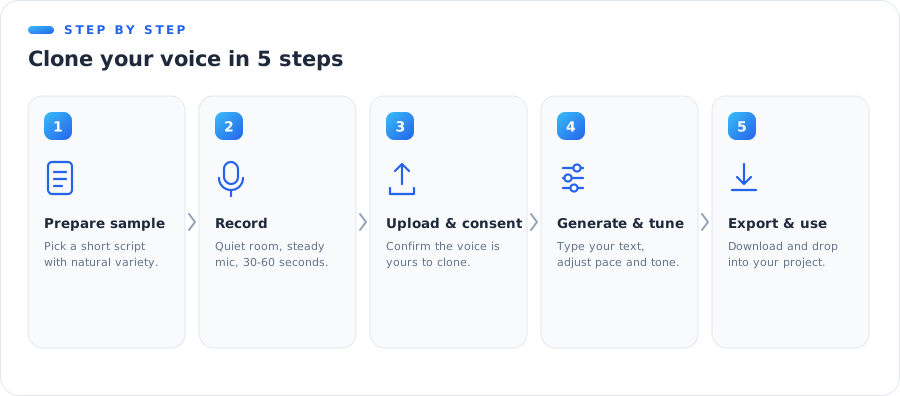 The 5-step voice cloning process at a glance
Step 1: Prepare Your Voice Sample
The sample is 80% of your result. Modern cloning models don't "average out" flaws in your recording — they faithfully reproduce them. Record in an echoey kitchen, and your clone will forever sound like it lives in an echoey kitchen.
If you want the deeper technical reason, our explainer on how voice cloning works covers what the model actually extracts from your sample. The practical summary: it captures tone, accent, pacing, and character — plus every acoustic problem you feed it.
Choose length deliberately
AnyVoice accepts anything from 15 seconds to 5 minutes. More is not automatically better:
- 15 seconds — works, and it's genuinely usable. Best when you need speed.
- 30–60 seconds — the sweet spot. Enough variety of sounds and intonation for a stable clone.
- 2–5 minutes — helpful only if the whole recording is consistently clean. One noisy section drags the average down.
A consistent 40-second sample beats an inconsistent 4-minute one. Every time.
Decide what to say
Don't read a legal disclaimer in a monotone. The model learns your delivery, so give it the delivery you want back.
Speak the way you want your clone to sound: if you'll use it for energetic YouTube narration, record yourself sounding energetic. If it's for calm audiobook reading, record calm.
💡 Pro tip
Talk about something you genuinely like for 45 seconds — your weekend plans, a show you're watching, your favorite meal. Natural enthusiasm produces dramatically better clones than scripted reading, because nobody reads a script the way they actually talk.
Step 2: Record a Clean Sample
You have two paths here: record directly in your browser with AnyVoice's built-in recorder, or record separately and upload the file. Both work equally well — what matters is the acoustics.
Get the microphone right
You don't need an expensive mic; you need to use whatever mic you have correctly.
- Keep the mic 15–20 cm from your mouth — close enough to dominate room sound, far enough to avoid breath pops.
- Angle it slightly off-axis (pointing at your cheek, not your lips) to soften plosives — the little "p" and "b" explosions.
- A phone's voice-memo app in a quiet room outperforms a studio mic in a bad room.
Fix the room, not the gear
Echo is the silent clone-killer. Hard, parallel surfaces bounce your voice back into the mic a few milliseconds late, and the model bakes that smear into every word your clone will ever say.
Quick fixes that cost nothing:
- Record inside a closet full of clothes — hanging fabric is a surprisingly good vocal booth.
- Throw a duvet over your desk and lean in under it. Ugly, effective.
- Avoid bathrooms, kitchens, and empty rooms with bare walls.
Deliver it like you talk
Read (or improvise) at your normal pace, with normal energy. Complete sentences, natural pauses. Don't perform a "radio voice" unless you want your clone stuck doing a radio voice forever.
Common recording mistakes
- Background music or TV — the model can't separate it from you; it becomes part of "your voice."
- A second person talking, even briefly — one speaker per sample, no exceptions.
- Long silences — trim them; dead air wastes your sample window.
- Whispering or shouting — record at the volume you'll actually use.
- Heavy filters or noise suppression — aggressive processing removes the texture the model needs. Record raw.
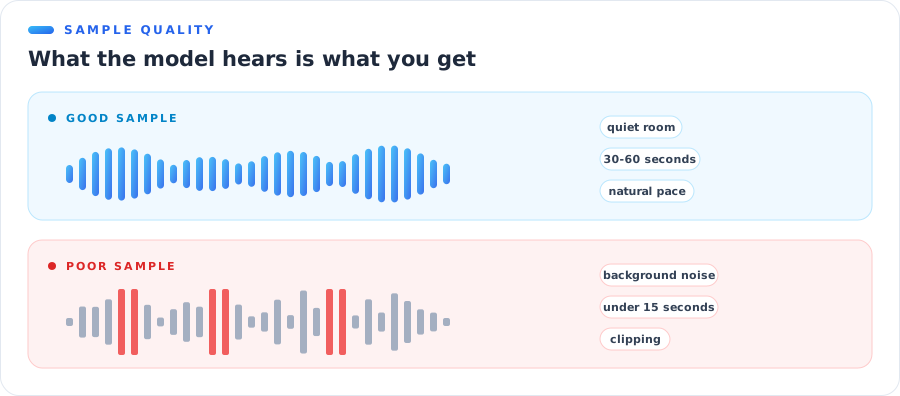 Clean sample vs. noisy sample: what the AI actually hears
Step 3: Upload and Confirm Consent
With a sample ready, the mechanical part takes under a minute.
Create a free AnyVoice account, head to your voice library, and either upload your file (MP3, WAV, M4A, AAC, OGG, or WebM, up to 20 MB) or record right there in the browser. Give the voice a name you'll recognize later — "Main narration voice" beats "Test 3 final FINAL."
The consent step (and why it exists)
Before any clone is created, you'll confirm a short statement: that you own the rights to the voice sample or have explicit permission to clone and use the voice.
This isn't bureaucratic decoration. Voice-cloning law tightened sharply in 2025–2026 — the EU now requires machine-readable marking of synthetic audio, and several US states treat a person's voice as a protected right. Reputable platforms record consent because creators genuinely need that paper trail. AnyVoice logs the confirmation with your clone, and every generation is watermarked by default, so the compliance box is ticked without you thinking about it.
Cloning your own voice? Then this step is 5 seconds of clicking a checkbox you can honestly agree to.
Step 4: Generate Your First Audio
Hit create, and the model builds your voice — this takes seconds, not hours. No training queue, no "come back tomorrow" email.
Now the fun part. Open the text-to-speech studio, select your new voice, type something, and generate.
Understand the credit math
AnyVoice prices generation the simple way: 1 character = 1 credit. Your free 5,000 signup credits (valid for 30 days) translate to about 5,000 characters — roughly 4–5 minutes of finished speech, enough to properly test your clone before deciding if you need more.
On the free tier, each generation can be up to 1,000 characters (about 45–60 seconds of audio); paid plans raise that to 5,000 characters per request and start at $9.99/month for 100,000 credits with 3 voice slots.
Test it properly, not politely
Don't just generate "Hello, this is a test." Stress-test the clone with text that resembles real work:
- A full paragraph with commas, questions, and an exclamation
- Numbers, dates, and a few unusual names
- The actual opening of a script you plan to use
Listen for pacing, breathing points, and whether emphasis lands naturally. If something feels off, the fix is almost always upstream — see the quality section below.
Steer delivery with punctuation
You don't get a mixing desk — you get something better: writing. The clone reads your text the way a human would, so punctuation becomes your direction system.
- Commas and periods create natural breathing pauses; short sentences read as deliberate and punchy.
- Question marks lift the intonation at the end of a phrase, exactly as your real voice would.
- Ellipses add a thoughtful hesitation… useful before a reveal.
- Paragraph breaks produce longer resets — treat them as scene changes, not just formatting.
If a line lands wrong, rewrite it before you regenerate it. Nine times out of ten, splitting one long sentence into two short ones fixes the pacing better than any setting could.
Try another language
This is the step that surprises people. Type a paragraph in Spanish, Japanese, or German and generate: your clone speaks it — same tone, same character, different language. AnyVoice supports 80+ languages from a single sample, which is why multilingual creators clone once and publish everywhere.
Step 5: Export and Put It to Work
Happy with the output? Download it and drop it into your workflow — video editor, podcast project, course platform, wherever.
A few practical habits that save time later:
- Generate in scenes, not essays. Shorter segments are easier to re-generate when you edit the script.
- Keep a naming convention —
ep12-intro-v2.mp3beatsaudio(7).mp3when you're assembling 40 clips. - Regenerate instead of editing. With traditional recording, a script change means a re-recording session. With a clone, it means retyping a sentence. Use that superpower.
Which export format should you pick?
For most work, MP3 is the right default — small files, universal support, and every editor accepts it. Reach for WAV (available on paid plans) only when a client or platform explicitly demands uncompressed audio, or when the clip will go through several more rounds of processing where compression artifacts could stack up.
Your voice lives in your library, so next week's episode starts at Step 4, not Step 1. That's the real payoff: recording is a one-time cost; generation is forever.
💡 Pro tip
Save your original sample file somewhere safe. If you ever want to rebuild your voice — or A/B test a new sample against the old one — you'll want the exact recording that worked.
How to Get the Best Quality
If your clone sounds off, resist the urge to blame the AI. In practice, almost every quality complaint traces back to the sample. Here's the systematic fix.
The 60-second sample checklist
Run through this before recording — it takes a minute and prevents 90% of quality problems:
- One speaker, and only one, on the recording
- No music, TV, traffic, fans, or keyboard clatter
- No echo (clap once — if you hear a tail, change rooms)
- 30–60 seconds of continuous, natural speech
- The energy and pace you actually want your clone to have
- No aggressive noise filters or "enhancement" applied
- Recorded at normal speaking volume, mic 15–20 cm away
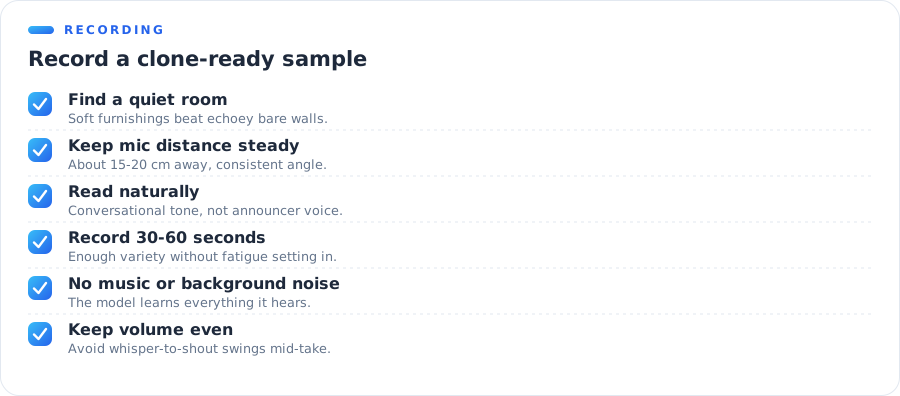 The pre-recording checklist that prevents robotic clones
Diagnose common failures
| Symptom | Likely cause | Fix |
|---|---|---|
| Robotic, flat delivery | Monotone or scripted-sounding sample | Re-record speaking naturally, with real energy |
| Muffled or "underwater" sound | Echoey room, mic too far | Move to a soft-furnished room, mic at 15–20 cm |
| Odd artifacts or noise in output | Background sound baked into sample | Re-record somewhere genuinely quiet |
| Doesn't sound like you | Sample too short or atypical delivery | Use 30–60 s of your normal conversational voice |
| Wrong pacing or rushed reading | Sample read too fast | Re-record at your natural pace with pauses |
| Inconsistent quality across clips | Mixed-quality long sample | Trim to the cleanest 60 seconds |
Notice the pattern: the fix is always a better sample, and a better sample costs five minutes. Iterating twice on your recording is the highest-leverage quality move available — no settings menu can compete with it.
What Can You Do with a Cloned Voice?
A clone is a tool, not a party trick. These are the four workflows where it earns its keep daily.
Video narration and YouTube
Record your sample once, then narrate every video by typing. Script changes stop meaning re-recording sessions, and your channel keeps a consistent voice even when you're travelling, sick, or recording at 2 a.m. Faceless-channel creators and tutorial makers were the earliest adopters for exactly this reason.
Audiobooks and podcasts
Narrating a full book means dozens of hours in a booth — or one good sample and a manuscript. Authors use clones to produce audiobook drafts in their own voice, and podcasters use them to patch flubbed sentences without setting up the mic again. The edit-by-typing workflow is addictive once you've tasted it.
Courses and training content
Course creators live in update hell: one changed feature means re-recording module 7. With a cloned voice, updating narration is a copy-paste job, and the new audio matches the old audio perfectly — same voice, same energy, zero continuity break.
Multilingual publishing
The compound move: your voice, speaking 80+ languages. Creators publish the same video in English, Spanish, and Japanese with narration that's authentically theirs in all three. Dubbing that used to require three voice actors now requires zero.
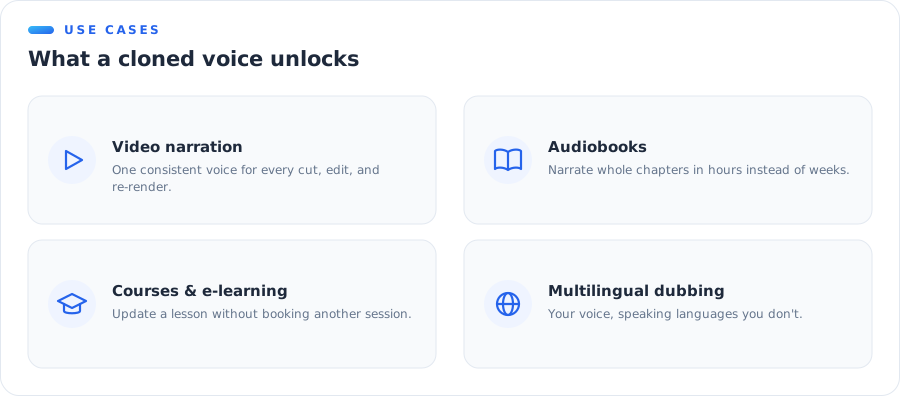 Four workflows where a cloned voice pays off daily
For a wider look at the tools landscape — including how AnyVoice compares to alternatives — see our tested roundup of the best AI voice cloning software.
Start with the Free Clone
Here's the entire guide in one paragraph: record 30–60 seconds of your natural voice in a quiet room, upload it, confirm consent, and generate. The AI does its part in seconds; the quality is decided by the five minutes you spend on the sample.
The free tier exists precisely so you can test this with zero risk: 5,000 free credits, 1 cloned voice, no card required. Record your sample today, run it through the checklist above, and hear your own AI voice before your coffee goes cold.
Clone your voice free with AnyVoice →
Want to compare plans first? The pricing page breaks down credits, voice slots, and what each tier unlocks.
Frequently Asked Questions
How long does it take to clone your voice with AI?
About 15 minutes end to end. Recording a clean 15–60 second sample takes a few minutes, uploading and consent takes one, and AnyVoice builds the voice model in seconds. Your first generated audio is usually ready within a quarter of an hour.
How much audio do I need to clone my voice?
As little as 15 seconds of clean, single-speaker audio. AnyVoice accepts 15 seconds to 5 minutes, but 30–60 seconds is the sweet spot — long enough to capture rhythm and accent, short enough to stay consistent.
Can I clone my voice for free?
Yes. Every new AnyVoice account gets 5,000 free credits (1 character = 1 credit, valid 30 days) and 1 cloned voice slot — enough to clone your voice and generate about 5,000 characters of speech without paying.
What audio format should my voice sample be?
MP3, WAV, M4A, AAC, OGG, and WebM all work, up to 20 MB. Format matters far less than recording quality — a clean phone recording in a quiet room beats a noisy professional-mic file every time.
Is it legal to clone my own voice?
Yes, completely. Your voice is yours. Legal risk only appears when cloning someone else without written consent — which is why reputable tools require a rights confirmation before cloning. Details in our legality guide.
Why does my AI voice clone sound robotic?
Almost always the sample, not the AI. Background noise, echo, a second speaker, or monotone reading are the top causes. Re-record 30–60 seconds in a quiet room, speaking naturally, and quality typically jumps immediately.
Can my cloned voice speak other languages?
Yes — AnyVoice clones speak 80+ languages while keeping your tone and character. Record once in your language, then type text in Spanish, Japanese, or German and hear it in your own voice.