Every scroll session serves it: that bright, slightly-too-cheerful voice reading a caption over a day-in-the-life vlog. TikTok's text to speech isn't just a feature — it's part of the platform's sound.
This guide answers the three questions people actually search: how to turn it on, what the voices are called (including the one everyone asks about), and how creators get voices TikTok doesn't offer.
What you'll learn:
- The 20-second how-to (and why the option hides on the text sticker)
- The real person behind the "Jessie" voice — and the lawsuit behind the switch
- An honest answer to the "Chinese accent voice" question
- Fixes when TTS won't appear, and the workflow for voices beyond the built-in ten
How to Use Text to Speech on TikTok
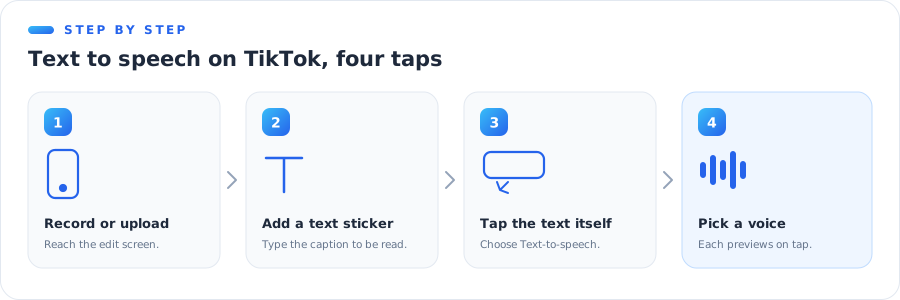
The feature lives somewhere slightly unintuitive — on the text, not in the audio tools:
- Record or upload your clip and tap the checkmark to reach the edit screen.
- Tap Text and type your caption.
- Tap the text sticker itself, then choose Text-to-speech from the pop-up menu.
- Pick a voice from the list — each previews on tap — and confirm.
The voice reads exactly what the sticker says, timed to when the sticker is on screen. Three practical details tutorials skip:
- Timing = sticker duration. Trim the text sticker's timeline to control when the voice speaks.
- Multiple stickers, multiple reads. Each text element gets its own TTS pass — that's how creators do back-and-forth "dialogue."
- Spelling is pronunciation. The voice reads what you typed, typos included. Creative misspellings ("gorls") are how creators steer it.
The Voices, Named
Jessie: the voice of TikTok
The default female voice — the one people mean when they say "the TikTok voice" — is community-named Jessie, and she's a real person: Canadian radio host Kat Callaghan.
The backstory matters more than trivia: the original North American female voice was replaced in 2021 after voice actress Bev Standing sued TikTok's parent company for using her voice without authorization. The case settled, the voice changed, and it remains one of the clearest early examples of voice rights becoming real law — the same current that produced today's consent rules, which we track in our voice cloning legal guide.
The rest of the lineup
TikTok rotates roughly ten English voices at any time, plus regional voices in other markets. Community names (TikTok labels them sparsely) cluster into families:
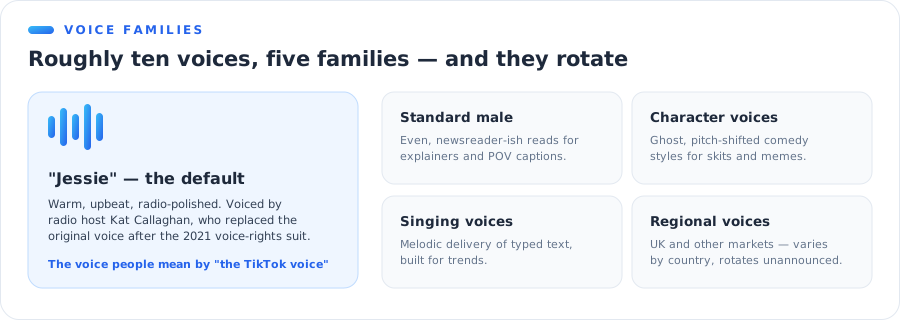
| Family | What it sounds like | Typical use |
|---|---|---|
| Jessie / default female | Warm, upbeat, radio-polished | Vlogs, storytimes, everything |
| Standard male | Even, newsreader-ish | Explainers, POVs |
| Character voices | Ghost, chipmunk-style pitch play | Comedy, skits |
| Singing voices | Melodic delivery of your text | Trends, memes |
| Regional voices | UK and other market accents | Local content |
Two warnings from experience: the lineup changes without announcement (voices in six-month-old tutorials may be gone), and availability differs by region — a voice you hear in a viral video may simply not exist in your country's app.
Six TTS Tricks Creators Actually Use
The feature is four taps; the craft is in how people bend it.
1. Spell for the ear, not the eye
The voice pronounces exactly what's typed, so creators steer it with deliberate misspellings — stretching vowels for emphasis, phonetic-spelling names it mangles, or leaning into a mispronunciation until it becomes the bit.
2. Punctuation is pacing
Periods buy pauses; commas buy shorter ones; a line of ellipses makes the voice hang before a reveal. Rewriting one sentence's punctuation is the fastest way to fix comedic timing without touching the edit.
3. Multi-sticker dialogue
Two text stickers, two voices, alternating on-screen timing — that's the entire mechanic behind "the voices are arguing" videos. Keep each sticker short so the exchange snaps.
4. The deadpan mismatch
The most durable TTS joke format: a relentlessly chipper voice reading catastrophically mundane or bleak text. The mismatch is the joke, which is why the default voice outperforms "funnier" character voices here.
5. Hide the text, keep the voice
After generating, shrink the sticker and drag it off-frame (or under another element) during moments where you want narration without on-screen text. The audio stays; the caption disappears.
6. TTS as a hook, human as the payload
A common structure for talking videos: TTS reads the first line — the pattern-interrupt every scroller recognizes — then the creator's real voice takes over. Familiar sound in, human connection after.
Does TTS help or hurt reach?
Honest answer: there's no credible evidence the algorithm favors or punishes TTS itself. What measurably helps is what TTS enables — captioned, watchable-on-mute videos with clear hooks. Treat the voice as an accessibility and retention tool, not a ranking hack.
"What's That Accent Voice Called?" — The Honest Answer
One of the most-searched TikTok TTS questions is about a Chinese-accented voice heard in memes. The honest answer, which no listicle will give you:
TikTok has no officially named accent voices. The voice list is unlabeled, region-dependent, and rotating. Accented voices in viral videos are usually one of three things:
- A regional TTS voice from another market's app, exported and reused.
- An external tool's voice, generated outside and added as audio.
- A trend sound — someone else's original audio, reused thousands of times.
The reliable identification method: tap the spinning record / sound name on the video itself. If it's a reused sound, you'll see its origin. If it's baked-in TTS, it can't be extracted — but it can be recreated: external TTS libraries carry accented English voices (Mandarin-accented English included) that get you the same effect with a voice you're actually licensed to use.
⚠️ Watch out: re-creating a specific real person's voice is a different thing from using an accented stock voice — the first needs consent, always. The Bev Standing lawsuit above is exactly what that line exists to prevent.
Not the Same Thing: TTS vs. TikTok's Voice Effects
Two different TikTok features get called "the voice thing," and mixing them up sends people hunting in the wrong menu:
- Text-to-speech generates a new voice from typed text. It lives on the text sticker.
- Voice effects transform your recorded voice — chipmunk, deep, robot, echo. They live under the Audio editing / Voice effects icon on the edit screen and only work on audio you recorded in-app.
The tell: if the video has narration nobody typed, that's a voice effect (or an imported track), not TTS. And if what you actually want is the third thing — your recording performed in a different, realistic voice rather than a pitch-shifted joke — that's an AI voice changer, which works on any audio file rather than only in-app recordings.
Does TTS work in photo mode?
Yes — text stickers in photo-mode posts support text-to-speech the same way, and it's become a staple of slideshow storytimes. Same rule applies: the voice follows each slide's sticker.
A quick word on other languages
Type non-English text and the English voices will read it phonetically — usually badly. TikTok serves different voice sets per region rather than one multilingual voice, so for clean non-English narration the external route wins again: generate in a TTS tool with native voices for the language, then import.
TTS Not Showing Up? Quick Fixes
- Tap the text, not the sound menu. The option only appears on a selected text sticker.
- Update the app. The feature and voice list move between versions constantly.
- Check your region. Some voices — and occasionally the whole feature — vary by country.
- Use a fresh text sticker. Text burned into an uploaded video isn't a sticker and can't be read.
- Still stuck? Generate the voiceover outside and upload with audio ready — the workflow below.
(For the reverse problem — a narrator you can't shut off — our turn text to speech on or off guide covers every platform.)
Where TikTok's TTS Hits Its Ceiling
The built-in feature is perfect for what it is: fast, free, and instantly recognizable. Its limits show up the moment content gets serious:
| TikTok built-in | External TTS | |
|---|---|---|
| Voice choice | ~10, rotating | Hundreds, stable |
| Script length | Caption-sized stickers | Whole scripts, one take |
| Audio file you keep | ❌ baked into video | ✅ MP3 download |
| Use on other platforms | Murky | ✅ with commercial plans |
| Your own voice | ❌ | ✅ via cloning |
| That famous TikTok sound | ✅ the original | Close, not identical |
The last row cuts both ways. If the joke is the TikTok voice, use the TikTok voice — familiarity is the punchline. Everything else on the list favors generating outside.
The Creator Workflow: Voices TikTok Doesn't Have
The pattern behind most polished "TTS" content you see is three steps, none of them inside TikTok's editor:
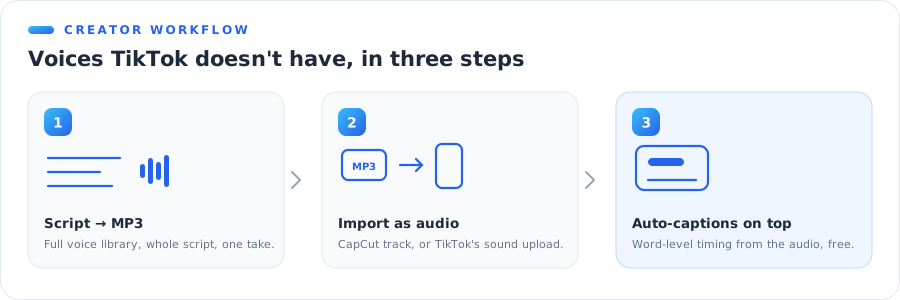
- Write the script and generate it in a TTS tool with a real voice library — our text to speech MP3 generator exports exactly the file you need, and the free tool covers quick tests without an account.
- Edit with the audio as a track — in CapCut (the full import walkthrough is in our CapCut text to speech guide) or directly in TikTok via the your sounds upload.
- Caption on top. Run auto-captions against the imported audio so the text matches the voice word-for-word.
What this unlocks over the built-in ten: narration longer than a sticker, a consistent voice across every video (the thing that makes a series feel like a show), commercial-safe licensing for sponsored posts — and, with voice cloning, a narrator that is literally you on days you can't record.
The Pre-Post Checklist
Thirty seconds before you hit post on a TTS video:
- Listen once with eyes closed. Mispronunciations hide when you're reading along with the caption.
- Check sticker timing against the cut. A voice that spills over a scene change reads as an error; trim the sticker, not the clip.
- Typos are now audio. The voice made every spelling mistake permanent — proof the text, then generate.
- Mind the volume stack. TTS over music over original audio gets muddy fast; duck the music while the voice speaks.
- Monetized or branded post? Built-in voices live under TikTok's license — for sponsored content, generate with a tool that grants commercial rights and import.
The Bottom Line
TikTok's text to speech earned its place in the culture: tap the text, pick Jessie, post. Use it freely when the platform sound is the point.
Know its edges, though — ten rotating voices, sticker-length scripts, no audio file, and licensing that stops at TikTok's walls. When a video matters beyond one post, generate the voice outside and bring it in: same aesthetic, none of the ceilings.
Make your next voiceover in any voice — free, no sign-up. Type the script, pick from a full voice library, download the MP3, drop it into your edit. Try the text to speech MP3 generator →